
Unlock Power Tools with Just a Few Clicks
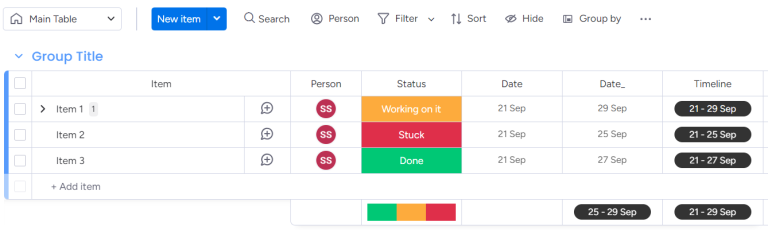
Step 1 : Choose Your Board
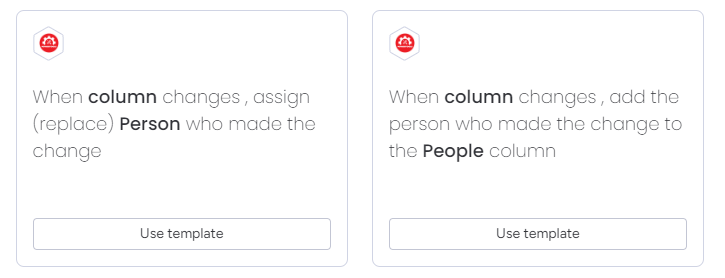
Step 2 : Select A Recipe
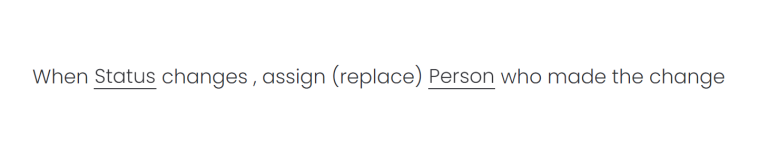
Step 3 : Configure Your Automation
Automation Recipes
When column changes on an item, change it’s subitems’ column to the
same value
| Description | Notes |
|---|---|
| 🔄 Automatic Updates : When the main column value changes, all subitems' columns will instantly update to reflect the same value. |
Supported Trigger Columns: You can choose any
supported column type in monday.com as the trigger. Matching Column Types: The subitems' columns must be of the same type as the main column to ensure proper synchronization. Limitations: - Unsupported Column Types: • monday Docs • Meeting Notes • Creative Briefs • Dependency Columns • Dropdown Columns - Bulk Item Updates: • Running automations for large bulk updates may take time due to system constraints. If an update involves a large number of subitems, the process can be slow and may cause failures due to JWT (security token) expiration. • When updating many items at once, especially those with multiple subitems, we recommend updating in smaller batches. (e.g., 5 items with 20 subitems each). This will help ensure that all automations run smoothly and complete successfully. • We’re actively working on improving this, with enhancements coming in future updates! |
When column changes, assign (replace) Person who made the change
| Description | Notes |
|---|---|
| ✨ Automatic Assigning: If no one is currently assigned, the automation will assign the person who made the update. If someone is already assigned, the automation will replace the assignee with the person who made the change. |
People Column: The "Person" column must be of the
People type. Column Flexibility: The trigger column can be any type on monday.com. Limitations: - Bulk Item Updates: • Running automations for large bulk updates may take time due to system constraints. • If the process takes unusually long, the automation may fail due to JWT (security token) expiration. • To prevent this, we recommend breaking large updates into smaller batches of a maximum of 50 items. • This approach helps ensure that all automations run smoothly and complete successfully. • We’re actively working to address this limitation, with improvements coming in future updates! |
When column changes, add the person who made the change to the People
column
| Description | Notes |
|---|---|
| ✨ Automatic Assigning: If no one is currently assigned, the automation will assign the person who made the update. If someone is already assigned, the automation will add the person who made the change along with the existing assignees. |
People Column: The "Person" column must be of the
People type. Column Flexibility: The trigger column can be any type on monday.com. Limitations: - Bulk Item Updates: • Running automations for large bulk updates may take time due to system constraints. • If the process takes unusually long, the automation may fail due to JWT (security token) expiration. • To prevent this, we recommend breaking large updates into smaller batches of a maximum of 50 items. • This approach helps ensure that all automations run smoothly and complete successfully. • We’re actively working to address this limitation, with improvements coming in future updates! |
When status changes to something, update start date and end date based
on timeline
| Description | Notes |
|---|---|
| 🛠 Auto-Adjust: When the status changes, the start and end dates are automatically adjusted to match the pre-set timeline. |
Status Column: The column must be of the ‘Status’
type. Date Columns: Both Start Date and End Date must be of the ‘Date’ type. Timeline Column: The Timeline must be of the ‘Timeline’ type. Limitations: - Bulk Item Updates: • Running automations for large bulk updates may take time due to system constraints. • If the process takes unusually long, the automation may fail due to JWT (security token) expiration. • To prevent this, we recommend breaking large updates into smaller batches of a maximum of 50 items. • This approach helps ensure that all automations run smoothly and complete successfully. • We’re actively working to address this limitation, with improvements coming in future updates! |
When status changes to something, update timeline based on start date
and end date
| Description | Notes |
|---|---|
| 🛠 Auto-Adjust: When the status changes, the timeline is automatically adjusted to match the pre-set start date and end date. |
Status Column: Ensure the column is set to the
‘Status’ type. Date Columns: Start Date and End Date should both be of the ‘Date’ type. Timeline Column: The column must be of the ‘Timeline’ type. Limitations: - Bulk Item Updates: • Running automations for large bulk updates may take time due to system constraints. • If the process takes unusually long, the automation may fail due to JWT (security token) expiration. • To prevent this, we recommend breaking large updates into smaller batches of a maximum of 50 items. • This approach helps ensure that all automations run smoothly and complete successfully. • We’re actively working to address this limitation, with improvements coming in future updates! |